
The Feldberg, read in light and in bricks
One 27 km square of the Black Forest through two apps: where the December sun leaves the slopes around the Feldberg in shade, and what the massif comes to in plates.

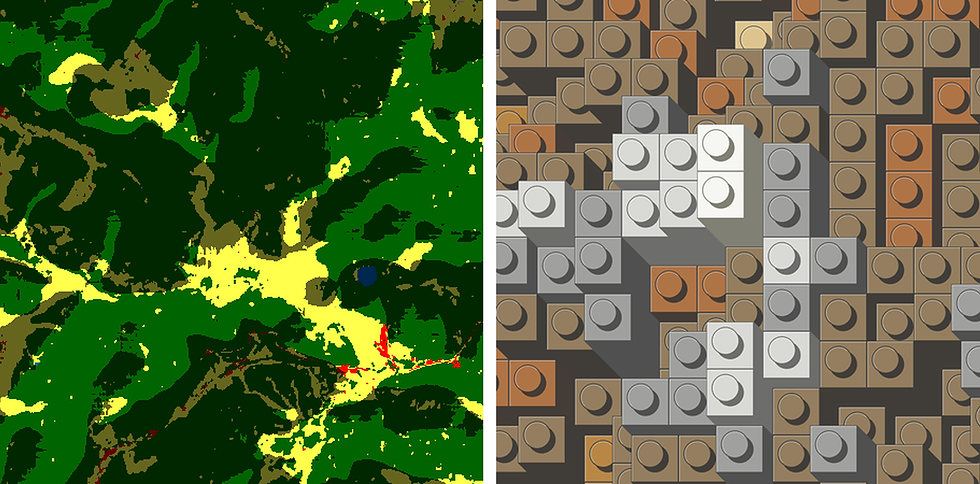
The same square around the Feldberg, the highest point of the Black Forest, from the Belchen near the left edge to the Titisee near the right. Left, Shadow Maps lights a land cover map at 10:00 on 21 December; right, Brixels builds the ground on a 32 × 32 plate, one plate for every 71 m of height. Map: ESA WorldCover 2021, shaded here.
The Feldberg is a broad dome, 1,493 m high, with valleys cut deep into its flanks. Two of the apps on this site start from its height and ask different things of it. Shadow Maps asks where the light falls at a given hour. Brixels asks how many plates each square of ground is worth. Give them the same square and each shows what the other leaves out.
Below: how to fix the square once, the two reads, and what each one hides. Open the Brixels half of it. The Shadow Maps half starts from a map file you make with one command and upload yourself, since a file cannot travel in a link.
How this one got made
The brick plate fixes the square
Start in Brixels, because its plate decides the square. The link centres the map just west of the Feldberg at zoom 11, with Limit to plate size on and Plate set to 32x32 under Bricks. One stud covers 838 m of ground at this latitude, so the plate is some 27 km across, roughly 7.81° to 8.17° east and 47.75° to 48.00° north. The link also sets Height factor to 2, which The Feldberg, brick by brick explains; here that comes to one plate for every 71 m.
Shadow Maps needs a map of the same square. The European Space Agency's WorldCover map sorts every 10 m of the planet's land into eleven classes, forest, grassland, cropland and built-up among them, and is free to use with a credit. GDAL cuts the square straight out of its online tile, without downloading the whole tile:
gdalwarp -t_srs EPSG:25832 -te 411100 5289500 437900 5316300 -ts 1500 1500 -r mode /vsicurl/https://esa-worldcover.s3.eu-central-1.amazonaws.com/v200/2021/map/ESA_WorldCover_10m_2021_v200_N45E006_Map.tif southern-black-forest.tif
It cuts the square in metres and resamples it to 1,500 × 1,500 pixels, 17.9 m each; mode keeps every pixel a single class. The file keeps WorldCover's own colours, which Shadow Maps draws as they are: dark green forest, yellow grassland, red buildings, blue water. It is 2.3 MB, well under the app's 80 MB upload limit.
December puts the north-west slopes in shade
Open Shadow Maps and upload the square under Georeferenced map (GeoTIFF). Click four points just inside its corners and press Finish polygon; everything outside that outline stays the plain map. The elevation comes by itself, with Source on Download 30 m (auto). Under Appearance, set Shadow opacity to 0.6, so the land cover stays readable under the shade. With Time on Single time, set Hour (local) to 10 and render the same hour twice, with the Date half a year apart.

The same hour, half a year apart. On 21 June the sun stands 52° up in the east-south-east and hardly anything is in shade; on 21 December it is 12° up in the south-east, and whole valley sides north-west of the ridges turn dark. Map: ESA WorldCover 2021, shaded here.
This is the read for time: what the place is like at one hour of one day. It cannot tell you how high anything is, because a long shadow comes from a tall ridge or from a low sun.
Terrain colours keep the slopes brown
Back in Brixels, open Colour and pick Terrain under Change colour map. I added Terrain to Brixels as a copy of Shadow Maps' relief colours, so that brick maps and shadow maps of the same area can share one set of colours. With the default, Geo, most of the upland turns white and grey. Terrain keeps white and grey for the summit plateau and browns for the slopes around it.

One change of colour map on the same build. In Geo most of the square reads as snow; in Terrain only the summit plateau stands apart, and the low ground towards Freiburg in the north-west turns green.
What each read hides
Put the two side by side and they disagree in useful ways. The shadow map draws the shape of every valley and which slopes lie dark at ten on a winter morning, but it gives no heights. The bricks count height in plates, yet a stud keeps one height for its whole 838 m square. The highest stud here stands for 1,415 m, about 80 m short of the summit, and a valley narrower than a stud merges into the ground beside it.
Roughly the same 8 km around the summit in both reads. On the left the light finds every side valley and the Feldsee; on the right the same ground is some ten studs a side, each one height for 838 m of ground.
From screen to object
Both apps keep what you can take away under Downloads, below the picture, once you have ticked the terms. Shadow Maps has one file, Shadow map (PNG): the lit map, sized for an A5 print. Brixels has a list.

Brixels' Downloads for this square. The caption under the first button is the build in one line: 32 × 32 studs on four 16 × 16 plates, 19 steps.
Brick map (PNG) is the bricks with a legend under them. 3D model (LDR) is free and holds every piece in place, 2,068 of them on the four base plates; BrickLink Studio opens it. Order these bricks (Gobricks) sends that model to Brickwith, Gobricks' own shop, and the caption under the button says it is an affiliate link. Isometric view (PNG) shows the same pieces standing on their baseplate. The designed instruction sheets are sold as a PDF under Building instructions (PDF).

The Brick map (PNG) download. The legend holds the scale: one plate is 71 m of height, one brick 212 m, and one stud covers 838 m of ground.
Other controls, one line each
Brick size under Bricks halves or doubles the ground under one stud, so on a fixed plate it shrinks or grows the square.
Colour by set to Land cover paints each stud with one class from Copernicus' 100 m global land cover map, a coarser cousin of the map under the shadows.
Time in Shadow Maps also averages a day, a month or a year of sun positions instead of one moment.
Add elevated areas (optional), under the map in Shadow Maps, raises an outline you draw, such as a title box, so it casts a shadow of its own.
Map data in this post: ESA WorldCover 10 m 2021 v200, © ESA WorldCover project 2021 / Contains modified Copernicus Sentinel data (2021) processed by ESA WorldCover consortium, CC BY 4.0; reprojected, resampled and shaded in Shadow Maps.
Your turn
Either picture can be ordered as a print from its own app, under Order a print of this creation.
Open the Brixels square and change one thing, a colour map or the height factor, and see which of the two reads it moves closer to. Or take a mountain of your own with a map to match, and send me what you made. I'll ask before I show it anywhere.
Next: taking a brick map all the way to a box of parts, in Build Vesuvius in real bricks.