
Skate-video still of a stair set that never existed
Take a rendered stair, put it through a camcorder's fisheye, grade and grain, and give it a scratched title.

The finished still: the twelve from Stairset, through Fisheye, Colour grade, a scribed title, Vignette and Grain in Random Effects. A5 PNG, 2480 × 1748 px.
A lot of 90s skate footage was shot on one camera, the Sony VX1000, with a fisheye on the front for the tricks filmed up close. I modelled four of the Stylistic effects in Random Effects on that camera and its MK1 fisheye: Fisheye, Vignette, Colour grade and Grain. They trade accuracy for look: a real lens model would add knobs without adding anything you'd see.
This post takes the twelve from the Stairset post and runs it through those four, with a title scratched in Scribe, until it looks like a frame from a video part nobody filmed. The still depends on two uploaded files, so it can't come back from a single link. The two inputs can: open the twelve in Stairset and the title card in Scribe, then follow along in Random Effects.
How this one got made
Start from a stair with colour in it
Open the twelve in Stairset, tick the terms under Downloads and take the PNG. In Random Effects, drop it on Upload image. It becomes the working image, and every effect you apply after this replaces it, so the effects stack in the order you apply them.
Colour matters here because Colour grade can only push the colour that is already there. A grey render gives its saturation nothing to work on.

What goes in: Stairset's free PNG of the twelve, exactly as downloaded. Note the small signature in the bottom right corner.
A fisheye strong enough to bend the steps
Open the Stylistic tab, click Fisheye, set Strength to 1.20 and Scale to 0.85, and press Apply Fisheye. Scale below 1 samples less of the frame, so the stair fills the lens instead of floating in it.

Fisheye Strength 0, 0.6, 1.2 and 2.0, Scale 0.85 in all four. Watch the step edges: straight at 0, bowed at 1.2, and at 2.0 the set shrinks into a ball in the middle of the frame.
1.2 is where the treads start to curve like a lens close to the bottom of a set, and the black corners read as a camera rather than a crop.
Grade before anything else
Click Colour grade and set Contrast to 1.40, Saturation to 1.60 and Exposure to 0. The dark green ground drops almost to black, the cream steps turn peach and the rail goes a deeper red.

Before and after Colour grade. The change is in the colour, not the shapes: warmer steps, a darker ground, a redder rail.
A scratched title, blended with Difference
Open the title card link in Scribe. It writes TWELVE in white on black, with Layers at 14 and Stroke weight at 3.0. Tick the terms and take its PNG, then drop that file on Blend image (optional) in Random Effects.

Where the two files go: the stair as the working image, the title card as the blend image.
Open the Blend tab. Screen is the obvious choice for white letters on black, since it drops the black and keeps the white. Try it at Opacity 0.80 and the letters all but vanish wherever they cross the pale steps: white over near-white is still near-white. Press Revert last and use Difference instead, at the same opacity. It inverts whatever sits under each stroke, so the word reads dark on the steps and light on the ground.

The title card, then Screen, then Difference, both at Opacity 0.8. Look at the middle letters: gone in Screen, readable in Difference.
Blend stretches the second image to fit the frame, so the square title card comes out about 1.4 times wider. Scratched letters take that well.
Vignette, then grain
Back in Stylistic, apply Vignette at Amount 1.00. It darkens the frame from the corners in, the way the edge of a wide lens does. It also takes care of something you can see in the blend images above: the Stairset and Scribe downloads each carry a small signature in the bottom right, and the vignette takes both into the dark.
Last, apply Grain at Amount 0.20. The default of 0.05 is barely there once the picture is scaled down, so push it.
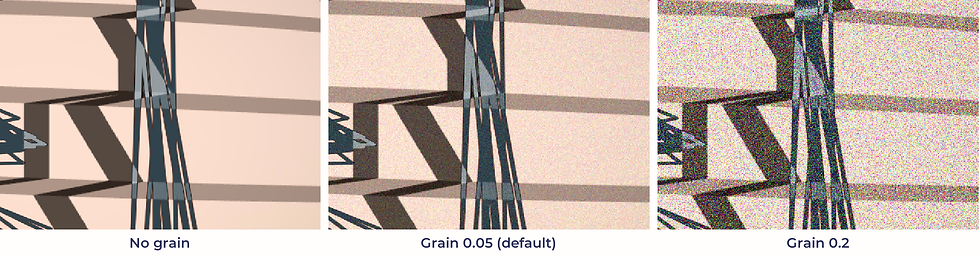
The same patch at 100 %: no grain, the default 0.05, and 0.2. Only 0.2 survives the trip down to a phone screen.
From screen to object
Under Downloads in Random Effects, tick the terms and take the PNG: A5 at 300 dpi, with Random Effects' own signature in the corner. That file is the still at the top of this post. Order a print of this creation sits under it if the still should go on a wall.
Other things to try, one line each
Revert last steps back one effect; Reset to original goes back to the upload.
Multiply with a black-on-white title card darkens instead of lightening.
The Watercolour tab takes a stair somewhere else entirely: Triple 5 Peach Fisheye Watercolor is a Stairset render through Fisheye and a watercolour.
Your turn
Open the twelve and the title card, run them through Random Effects and change one thing on the way: your own word in Scribe, or Fisheye at 2.0.
If the still comes out well, send me what you made. I'll ask before showing it anywhere.