
Squaresmith: 1,518 squares, no two the same size
A forest render goes into Squaresmith and comes back as a rectangle tiled exactly by squares, every one a different size.

The finished piece as the PNG (A5, 300 dpi) download gives it: 1,518 squares in a rectangle 2.643 times as wide as it is tall, coloured with the render's own palette.
How do you fill a rectangle with squares of all different sizes and leave no gap? Four Cambridge students, Brooks, Smith, Stone and Tutte, answered it in 1940: draw the rectangle as an electrical circuit and solve the circuit. Squaresmith, named for Cedric Smith, does exactly that. It came straight out of aiyopasta's film What's Hiding In The 8,000 Squared Mosaic?, which runs the same trick backwards on a Stanford bunny.
Below is how the piece above got made, four decisions in order, then what the download holds. Open the settings used here and upload a picture of your own as you read.
How this one got made
A forest goes in, blue and red comes out
Open squaresmith.krshi27.art, leave What are you tiling? on Photo and upload a picture under Photograph. This one is Sequoia, golden autumn twilight, a wood that Overstory drew from its own decision trees, gold and teal buds on navy branches.
The first render has nothing of the forest in it. Five big red squares sit across the top, and hundreds of blue ones pour into a funnel at the bottom.

Same input, default settings: the colours say how big each square is, and nothing about the picture yet.
The app estimates how far away each part of the photo is, scatters points more densely where that depth changes, and joins them into triangles. That network of triangles is what gets tiled, so the picture decides how many squares there are and how they connect. It does not decide where they sit.
The squares fit because they are a circuit
Every horizontal join line in a squared rectangle is a node, with a voltage equal to its height. Every square is a wire, carrying a current equal to its side. At each join line, the widths of the squares arriving from below add up to the widths leaving above, which is Kirchhoff's law. Solve the network and the squares fall out, exact to about fifteen decimal places, with no packing by trial and error anywhere.

Moroń's 33 × 32 rectangle, nine squares, the fewest any rectangle of all-different squares can have: follow the 18 square on the left to the orange 18 wire on the right, which runs from the node at height 14 to the one at 32.
The forest piece is the same thing with 2,168 wires. Solved with no floor, its largest square is 188,160 times the size of its smallest.
The render's own colours bring the gold back
Open Colour and set Colour by to The photo's own colours. The app takes 24 colours from the picture and gives each one the share of the mosaic's area it covered in the picture. I share them out by area, because the sizes differ so much that counting squares would say very little.
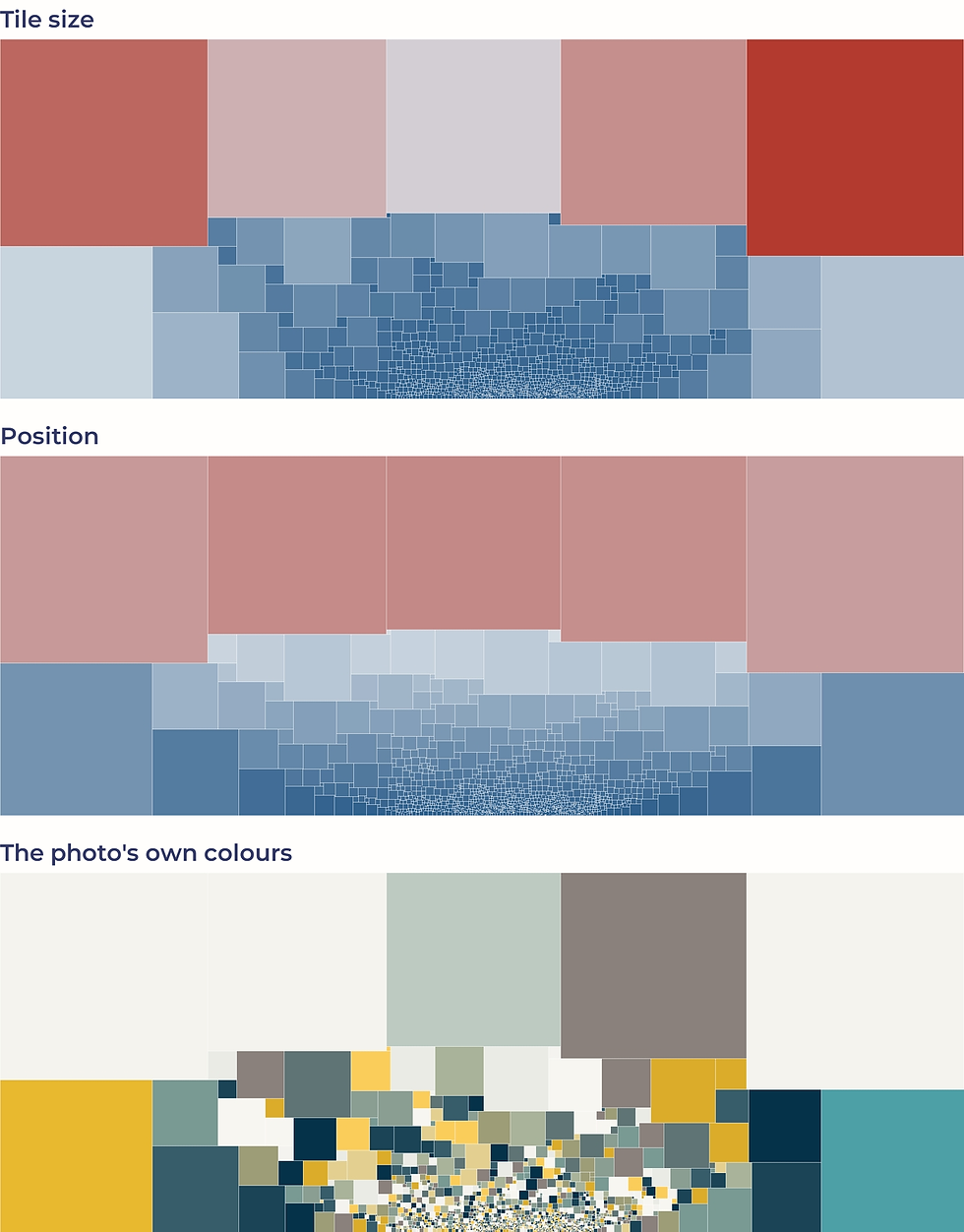
Tile size, Position, The photo's own colours: the geometry stays put and only the meaning of the colour changes.
Colour is the only thing left to choose once the maths has placed every square, so I spend it on saying something about the geometry or the picture.
Focal point 6 lifts the gold to the top
Focal point moves where the circuit's battery connects, and with it where the squares crowd together. It is one number, and it changes the whole balance. At 0 the big gold square sits bottom left, at 3 a gold square holds the right edge, and at 6 one lands top centre between the grey and the sage. That is where this piece stayed.

Focal point 0, 3 and 6: the large squares trade places and the swirl of small ones slides along the bottom edge.
A higher floor leaves a hole, so the floor stays low
Smallest tile folds away squares below a share of the largest one. At 0.0200 the piece drops to 301 squares and reads bolder, but the middle of the swirl goes bare: the line under the picture reports 1.46% of the area gone. I count what the floor drops and print it there, because a mosaic whose whole claim is exact coverage must not lose squares without saying so.

0.0030 against 0.0200: look at the bottom centre, where the higher floor leaves a white gap instead of tiny squares.
Back at the default 0.0030, 650 squares go, 0.03% of the area. Last, an Outline of 0.8 in the navy of the branches (Outline colour #053248) keeps the off-white squares apart from each other, and Canvas colour #F4F3EE matches the render's own paper.
From screen to object
Under the picture sit the line that counts the squares, three figures, and The certificate: the Bouwkamp code, the standard notation for a squared rectangle. Its first three numbers are the count, the width and the height, measured in smallest squares; after that come the sides, row by row from the top. The whole piece can be rebuilt from that one line, so copy it from there.

Everything the piece is, in writing, above the one file the download gives you.
PNG (A5, 300 dpi) is the download. It is always landscape, because every mosaic this app makes comes out wider than tall, and Print canvas fit decides whether it letterboxes onto the page, crops or stretches. A print can be ordered from Order a print of this creation.
A 3D model works too
Switch What are you tiling? to Mesh and upload a model under 3D model (.obj, .stl, .ply or .glb). The model's own triangles become the network; open rims get closed and handles cut, and the app says what it repaired. This lumpy ball is the shape the app's own tests use: 320 triangles, pushed in and out at random.

431 squares, and a mirror-symmetric pattern from a lopsided lump: the tiling reads which triangles touch, never where the corners are.
Other controls, one line each
Detail: roughly a third of the number of squares; more takes longer to solve.
Seed: a different arrangement of the same surface.
Low, Middle, High and Flip the palette: the gradient for Tile size and Position.
How many colours: how many colours come from the photo; above about 30 the shares stop matching exactly.
Quick palette: drops a brand palette into the colour slots.
Your turn
Open the settings, upload a picture of your own, and walk Focal point until the big squares land where you want them. Then send me what you made. I'll ask before I show it anywhere.